You’re probably staring at three different health apps right now, trying to decide which one deserves a permanent place on your phone. One app tracks sleep beautifully but ignores nutrition, another logs meals but feels clunky for daily use, and your wearable keeps collecting data you never act on. The problem isn’t a lack of information, it’s choosing the best health tracking apps for the job you need done, whether that’s recovery, food precision, schedule adherence, or all three.
Health apps are no longer niche. In 2025, the category generated $3.5 billion in revenue, reached 313 million users, and saw 405 million downloads worldwide, which shows how far these tools have moved into mainstream behavior (Business of Apps health app market). The challenge now is less about finding an app and more about finding the right one for your workflow. If you’re also trying to improve posture, you can find recommended posture improvement tools, but for health tracking, the win comes from matching the app to the signal you care about most.
Table of Contents
- 1. PepFlow
- 2. Apple Health
- 3. Google Health App
- 4. Oura Ring and App
- 5. WHOOP
- 6. Cronometer
- 7. MyFitnessPal
- Top 7 Health Tracking Apps Comparison
- How to Choose Your Perfect Health Tracking Stack
1. PepFlow
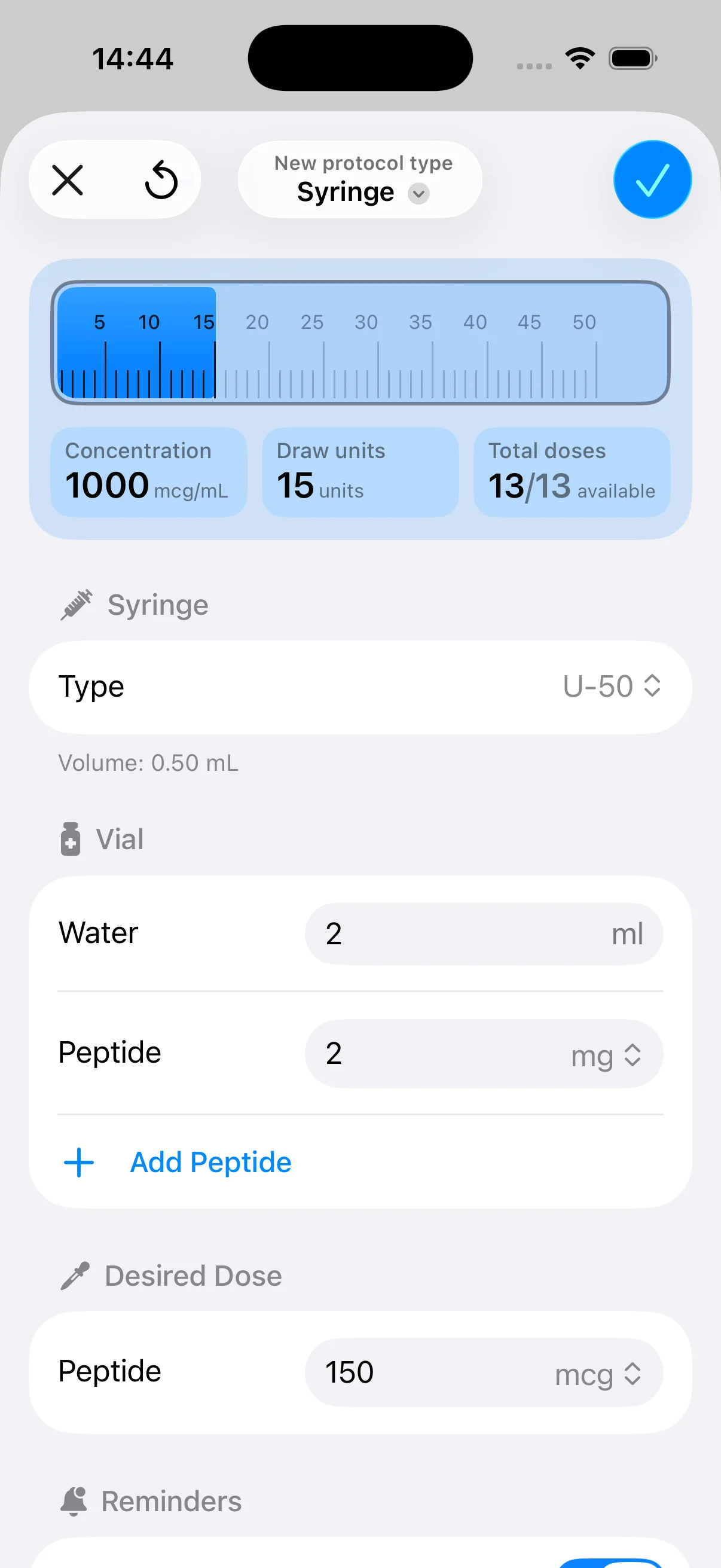
PepFlow is the one I’d pick when the main problem is schedule adherence, not general wellness. It’s built to remove guesswork from peptide protocols, so instead of juggling notes, calculator apps, and reminders, you can manage dosing, timing, and history in one lightweight workflow. For anyone following a structured regimen, that kind of friction reduction matters more than flashy dashboards.

Why it stands out for protocol tracking
PepFlow’s strongest feature is the dosage calculator, which converts target microgram amounts into practical unit measurements and helps you configure vials, concentrations, and injection volumes correctly. That’s a very different value proposition from a general wellness app. It’s not trying to interpret your whole body, it’s trying to keep your protocol accurate and consistent.
Practical rule: If your health routine depends on precise doses and repeatable timing, use an app that reduces manual math before it adds more charts.
It also does the operational stuff well. You can create cycled protocols with flexible start dates, custom dosing frequencies, planned pause periods, real-time countdowns, push notifications, live activities, widgets, and quick log-dose actions. That combination makes it useful for fitness enthusiasts, biohackers, coaches, and anyone who needs a cleaner daily routine than a notes app can provide. Its support resources, including a knowledge base, reconstitution guidelines, a cheat sheet, and a blog, add context without forcing you to leave the app ecosystem.
PepFlow is also privacy-forward for personal use, and it doesn’t broadly share health data. That matters if you don’t want your regimen scattered across multiple platforms. The trade-off is just as important, though, because it’s explicitly not a substitute for professional medical advice or clinical oversight. If you want a deeper look at the broader ecosystem, PepFlow also curates a useful roundup at best biohacking apps.
2. Apple Health
Apple Health is the safest default for most iPhone users because it starts as a central health hub, not a specialty tracker. It pulls in data from Apple Watch, iPhone sensors, connected devices, and third-party apps, so it’s often the first place I recommend if someone wants one place to see their health data without committing to a subscription-heavy stack. It’s free, preinstalled on iOS and iPadOS, and designed around privacy controls rather than aggressive data sharing.
The strength here is breadth, not depth. Apple Health handles medication logging and reminders, sleep, activity, trends, labs, and records where supported, plus health sharing with family or caregivers. That makes it especially useful for people who want a baseline dashboard before adding a more specialized app on top.
Best for iPhone users who want a clean foundation
If you’re already inside the Apple ecosystem, Apple Health gives you the least friction and the most compatibility. It’s also the easiest place to keep passive data from disappearing into separate app silos. If you later add a ring, band, or nutrition tracker, Apple Health can serve as the aggregator.
For users comparing ecosystem tools, think of Apple Health as the inbox and not the analyst. It will show you what’s happening, but it won’t coach you nearly as aggressively as a purpose-built app. That’s fine for a lot of people. It’s a problem only if you expect it to turn raw data into behavior change on its own.
One practical strength is that Apple Health works well as the anchor for mixed setups. If you want to see how a peptide schedule, sleep trend, and workout log coexist, this is usually where the data should land before you interpret it elsewhere. For a peptide-specific companion perspective, PepFlow’s own best peptide tracker apps page shows how specialized scheduling tools fit alongside a broader health hub.
3. Google Health App
Google’s redesigned Fitbit app, now the Google Health app, makes sense for users who want one place to view activity, sleep, stress, and medical records without living inside Apple’s ecosystem. The app uses four tabs, Today, Fitness, Sleep, and Health, which keeps the interface cleaner than older Fitbit layouts and makes it easier to jump straight to the type of data you care about. It works with Fitbit devices and Pixel Watch, and it’s available on iOS and Android.
The most practical strength is that it doesn’t require a wearable to be useful. The app can track walks, runs, and hikes using your phone alone, which makes it more accessible than many hardware-first platforms. Google also says the app can connect with hundreds of apps and devices through Health Connect, Apple Health, or Google Health APIs, so people already using multiple tools can centralize more of their activity data.
Where it fits in a real-world stack
Google Health is a smart pick for users who want a decent all-rounder with room to grow into premium coaching. The Google Health Premium tier adds AI-driven coaching through Google Health Coach, which may appeal to users who want extra guidance rather than just numbers on a screen. It also supports syncing medical records in the U.S., which can make lab and medication histories easier to revisit over time.
The transition from Fitbit to Google Health matters most if you’re already wearing Fitbit or Pixel Watch hardware, because that’s where the app feels most complete.
The trade-off is continuity. Some legacy Fitbit features changed or disappeared during the transition, and the strongest experience still assumes you’re inside the Google hardware ecosystem. If you’re okay with that, the app offers a practical mix of activity, sleep, and health logging that works across phones and devices. For people building out their wearable setup, the Nothing But Bands Charge bands page is a useful accessory reference.
4. Oura Ring and App
Oura is the best choice when sleep and recovery are the priority. The ring captures overnight physiology continuously, then turns that into Sleep, Readiness, and Activity scores that are easier to act on than a wall of raw metrics. Compared with wrist-based trackers, the big draw is how it works, you wear the ring, sleep, and let the app handle the interpretation.

Why recovery-focused users like it
Oura tracks overnight physiology such as HRV and temperature trends, which makes it especially useful for athletes, founders, and anyone who wants a clearer recovery signal without wearing a watch all day. The app’s membership provides advanced analytics and an AI-powered Oura Advisor, so the platform keeps getting more useful over time without requiring new hardware every season.
There’s a reason Oura keeps showing up in serious health stacks. It gives you a strong answer to the question, “Am I recovered enough to push today?” That’s more actionable than a generic wellness score, especially when you’re balancing training, travel, stress, or poor sleep. It also fits well alongside broader hubs like Apple Health, because the ring is a specialist, not a replacement for your whole ecosystem.
The trade-off is obvious. You need to buy the hardware, and you need membership access for the full feature set. Real-time workout metrics are also more limited than on some watches, so Oura is not the right pick if you want live pace, lap splits, or heavy training telemetry. It shines when the goal is better rest and more informed recovery decisions, not exercise coaching during the workout itself.
5. WHOOP
WHOOP is built for people who treat training load, recovery, and sleep like daily inputs, not occasional curiosities. The band stays on 24/7, and the app translates that continuous wear into strain, recovery, and sleep coaching. For athletes and high-compliance users, that constant signal is the point.
The platform also leans hard into interpretation. WHOOP isn’t just collecting data, it’s trying to tell you when to push and when to back off. That matters if you train seriously and want a daily readiness readout instead of manually piecing together sleep, soreness, and session load.
Best for athletes who want behavior guidance
WHOOP fits people who want a structured recovery system more than a general wellness dashboard. It also supports uploading past lab results and exploring advanced labs inside the WHOOP ecosystem, which makes it more flexible than a pure movement tracker. If you’re coaching someone who follows a training plan, the app can help reinforce consistency and compliance.
Useful distinction: WHOOP helps you act on recovery signals, while generic trackers mostly help you observe them.
The main downside is the subscription model. You’re paying for the ongoing service, not just the device. It also isn’t a phone-only solution, so it’s a poor fit for anyone who wants software without wearing hardware. For users who like structure, PepFlow’s training schedule app perspective pairs well with WHOOP’s recovery-first philosophy, even though the tools serve very different regimens. If you also want a broader performance lens, stop guessing your health data is a useful reminder that raw metrics need interpretation.
6. Cronometer
Cronometer is the most convincing nutrition tracker in this group if your goal is micronutrient accuracy. It uses lab-analyzed food databases and goes deep on nutrient coverage, which makes it valuable for people who care about more than calories and protein. If you want to understand how diet relates to fasting windows, biometrics, or specific goals, this is one of the strongest options.

Best for biohackers and data-driven eaters
Cronometer integrates with Apple Health, Fitbit, Google Health, Garmin, Oura, and WHOOP, which makes it especially useful in a multi-device stack. That means you can correlate food intake with sleep, activity, and recovery without manually stitching data together in a spreadsheet. For self-experimentation, that’s a huge advantage.
The premium Gold tier adds Oracle Nutrient Search, custom charts, a macro scheduler, photo and voice logging, Nutrition Scores, custom biometrics, and a fasting timer. Those features matter because they turn nutrition logging from a static diary into something you can use for pattern recognition. If you’re testing how food timing affects energy or training output, Cronometer gives you better analytical tools than most calorie counters.
The downside is that it can feel more manual than meal-plan-style apps. You get accuracy, but you pay for it with more input effort. That’s fine if you like control and want high-quality data. It’s frustrating if you just want a fast, frictionless meal log. For people building a serious diet-performance stack, Cronometer is the app that usually earns the “specialist” label.
7. MyFitnessPal
MyFitnessPal remains the easiest choice for people who want calorie and macro tracking without a steep learning curve. It has a large food database, community features, and broad integrations with more than 40 devices and apps, so it’s a familiar starting point for a lot of users. That reach is part of why it still belongs in any list of the best health tracking apps.
The app works best when logging has to stay simple. Barcode scanning, meal scan tools, voice logging, and premium automation features help reduce the daily friction that usually kills nutrition tracking. If you’re trying to stay consistent rather than becoming a nutrition scientist, that simplicity is valuable.
Where it beats more specialized apps
MyFitnessPal has one of the biggest advantages in daily habit formation, it’s easy to keep using. The community library and massive database make it forgiving for users who eat a lot of packaged foods or repeated meals. For people who want to connect food intake to training, weight goals, or general accountability, that ease of use often matters more than highly technical nutrient granularity.
The trade-offs are real. The free tier includes ads and fewer automation tools, and some foods are user-submitted, so verification still matters. Premium availability also varies by country, which can affect feature access. Still, if your main goal is to log meals consistently and see the big picture, MyFitnessPal remains one of the most practical choices.
If you need a nutrition app that your clients or training partners will actually stick with, MyFitnessPal is usually easier to adopt than more specialized tools.
Its role in a health stack is straightforward. Use it when food logging needs to be fast, familiar, and broadly compatible. Use something like Cronometer when you need more precise nutrient analysis and deeper self-experimentation.
Top 7 Health Tracking Apps Comparison
| Item | Implementation complexity 🔄 | Resource requirements ⚡ | Expected outcomes 📊 | Ideal use cases 💡 | Key advantages ⭐ |
|---|---|---|---|---|---|
| PepFlow | 🔄 Moderate, initial vial/protocol setup; simple daily logging | ⚡ App-only (iOS listed; Google Play noted); pricing tiers unclear | 📊 Precise dosing and improved adherence; fewer calculation errors | 💡 Peptide users, biohackers, coaches managing cycles | ⭐ Precise dosage calculator + robust adherence tools; privacy-forward |
| Apple Health | 🔄 Low, preinstalled, minimal setup; integrates automatically | ⚡ Requires iPhone (and Apple Watch for richer data); free | 📊 Unified metrics, medication reminders, long‑term trends | 💡 General iOS users wanting consolidated health data | ⭐ Free, strong privacy controls, deep Apple ecosystem integration |
| Google Health app (Fitbit) | 🔄 Low–Moderate, install and pair devices; Premium optional | ⚡ Cross‑platform (iOS/Android); works best with Fitbit/Pixel; Premium subscription available | 📊 Consolidated activity/sleep; AI coaching with Premium | 💡 Fitbit/Pixel users and cross‑platform activity/sleep tracking | ⭐ Solid sleep/activity tracking; Premium AI coaching option |
| Oura (Ring + App) | 🔄 Moderate, hardware pairing and app calibration; membership optional | ⚡ Requires Oura ring purchase; membership for advanced analytics | 📊 High‑quality sleep, HRV, temperature trends; readiness scores | 💡 Users prioritizing sleep/recovery and athletes | ⭐ Best‑in‑class overnight physiology and recovery insights |
| WHOOP (Band + App) | 🔄 Moderate, continuous wear and ongoing band/app setup | ⚡ WHOOP band required; ongoing subscription/membership | 📊 Actionable strain, recovery, and sleep coaching | 💡 Athletes/coaches optimizing training load and recovery | ⭐ Continuous capture with actionable training/recovery guidance |
| Cronometer | 🔄 Moderate, detailed food logging and nutrient setup; learning curve | ⚡ App/web; Cronometer Gold unlocks advanced features | 📊 Accurate macro/micronutrient tracking and diet‑biometrics correlations | 💡 Nutrition‑focused users, clinicians, self‑experimenters | ⭐ Lab‑verified food data and deep micronutrient coverage |
| MyFitnessPal | 🔄 Low, quick setup and easy daily logging | ⚡ App/web; large free tier with ads; Premium for advanced tools | 📊 Calorie/macronutrient tracking and weight management support | 💡 Casual dieters and users needing fast logging and community help | ⭐ Huge food database and very simple daily logging workflows |
How to Choose Your Perfect Health Tracking Stack
The best health tracking app is the one you’ll keep open every day. If your biggest problem is missed doses or inconsistent protocols, a scheduling-first tool like PepFlow makes more sense than a broad wellness app. If you care about recovery, Oura and WHOOP solve different problems, with Oura leaning toward sleep and overnight physiology and WHOOP leaning toward continuous training guidance.
The most effective setup is usually a stack, not a single app. Apple Health works well as a central hub for iPhone users, Google Health is a strong alternative for Fitbit and Pixel Watch users, Cronometer gives you the deepest nutrition view, and MyFitnessPal wins when daily food logging needs to stay simple. The point isn’t to collect every metric available, it’s to make the data you already have easier to use.
That’s where they go wrong. They choose the app with the most features, then stop using it because the workflow is too heavy. A better approach is to start with one primary signal, sleep, recovery, nutrition, or adherence, then add one supporting app only if it closes a real gap.
For athletes, that often means a wearable plus a nutrition app. For biohackers, it may mean a specialist tracker plus a central health hub. For people managing recurring regimens, it means a tool that keeps timing, history, and reminders tight enough that you don’t drift. Once the stack matches the goal, the app stops being a distraction and starts acting like a useful system.
If you want a cleaner way to manage precise dosing, reminders, and protocol history, PepFlow is built for that exact job. It pairs a microgram dosage calculator with cycle planning and adherence tools, which makes it a strong fit for anyone who wants more structure in a health routine. Visit PepFlow to see how it can help you stay consistent without adding extra noise.