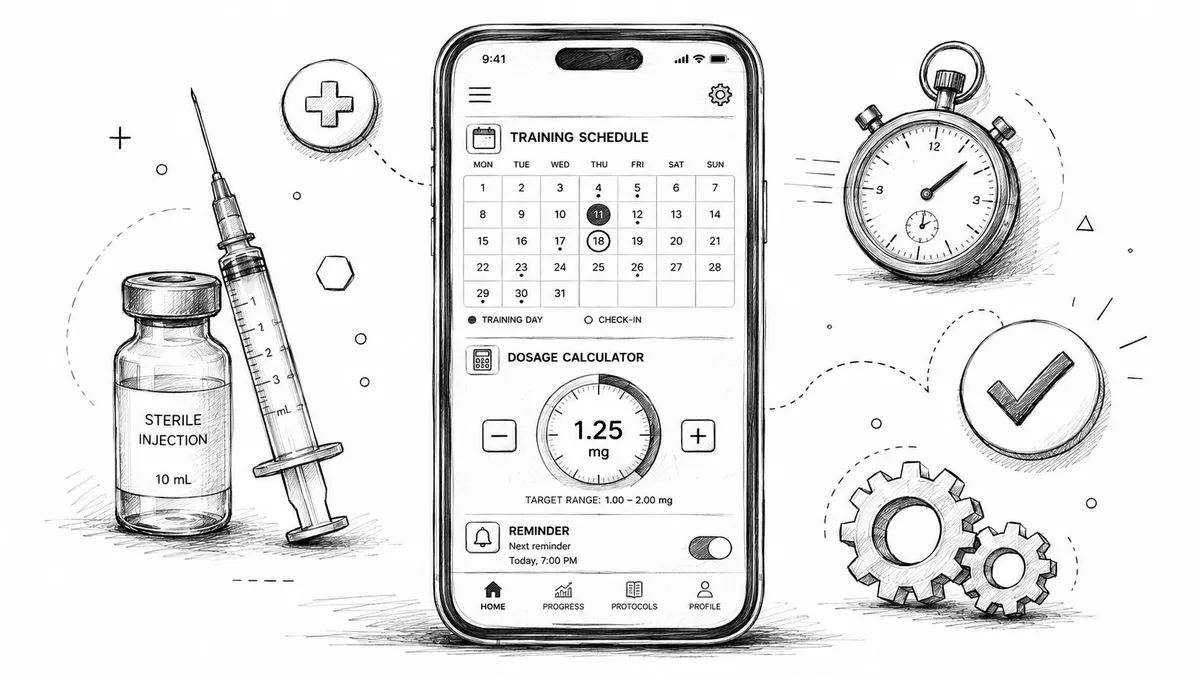
You probably have some version of this running right now. A notes app with dose times. A spreadsheet with vial math. A calendar reminder that says “inject” but doesn’t tell you how much. Maybe a second app for workouts, a third for sleep, and a mental backup system that works until travel, fatigue, or one missed day throws the whole plan off.
That setup is fine for a simple gym split. It breaks down fast when you’re managing a structured peptide protocol alongside training. Timing matters. Concentration matters. Cycle length matters. If you’re trying to line up doses with sessions, recovery days, or meals, memory and generic reminders stop being “good enough.”
A proper training schedule app solves a different problem than a basic planner. It doesn’t just tell you what day it is. It gives you one place to run the schedule, the calculations, the reminders, and the history. That’s the difference between logging activity and managing a protocol.
Table of Contents
- Understanding the Modern Training Schedule App
- Key Features Your Training Schedule App Must Have
- Integrating Peptide Protocols with Your Training Schedule
- A Practical Guide to Setting Up Your Peptide Cycle in an App
- Best Practices for Adherence and Data Privacy
- Frequently Asked Questions About Training Schedule Apps
Understanding the Modern Training Schedule App
A modern training schedule app isn’t just a digital calendar with better design. It has become a control layer for structured health routines. That includes workouts, recovery sessions, reminders, logs, wearable data, and for some users, supplement or peptide timing.
Usage patterns show why this category matters. The global fitness app market saw usage surge by over 330% between 2019 and 2021, and workout and weight loss apps account for 73% of all health and fitness app sessions, which points to how heavily people rely on structured planning and progress tracking (Flurry health and fitness app usage data).
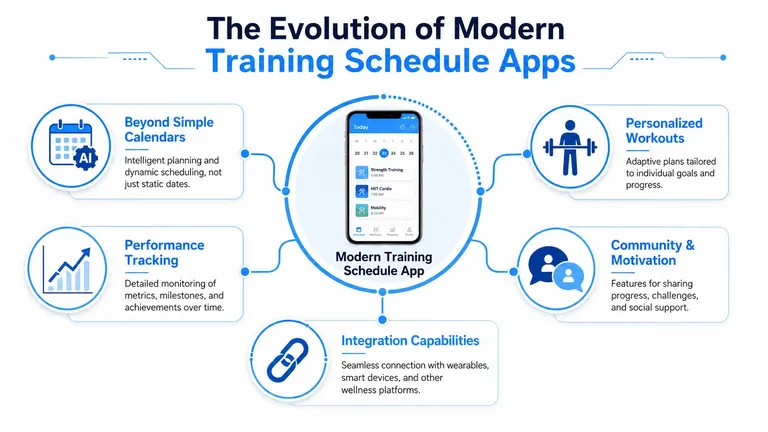
From calendar replacement to command center
The easiest way to think about it is this. A spreadsheet stores information. A true training schedule app manages decisions in motion.
If your plan changes, the app should help you adapt without rebuilding everything manually. If you log a workout late, skip a dose window, or need to shift a session, the system should show the next correct action, not leave you doing arithmetic and date math on your own.
That’s why I think of these tools as a digital command center. You want one place that can answer four questions instantly:
- What’s next
- When is it due
- What exactly am I taking or doing
- What already happened
For gym operators and coaches, the same logic applies at a broader level. Tools that manage gym schedules efficiently help reduce scheduling chaos across staff, rooms, and sessions. At the personal protocol level, the principle is the same. Centralization beats scattered systems.
What basic tools still get wrong
Generic reminders fail because they’re blind. They know a time, but not context. A reminder can tell you “8:00 PM,” but it can’t reliably account for vial concentration, protocol frequency, recovery sequencing, or how a missed event affects the rest of the cycle.
A workout logger also isn’t enough. Most were built to record sets, reps, and completed sessions. That’s useful, but it’s different from running a time-sensitive regimen where planning accuracy matters as much as the log.
Practical rule: If the tool can’t connect schedule, calculation, reminder, and history in one workflow, it’s not managing your protocol. It’s only documenting pieces of it.
You also want the app to fit the way you live. Home screen glanceability, lock screen timers, simple logging, and low-friction edits matter more than bloated dashboards. Good systems reduce daily decisions.
If you want a closer look at how dedicated routine tools differ from generic planners, this breakdown of a routine schedule app for consistent habit planning is a useful comparison point.
Key Features Your Training Schedule App Must Have
A lot of apps look polished in screenshots and still fail in real use. The test isn’t whether the interface is clean. The test is whether the app can handle a protocol that gets messy.
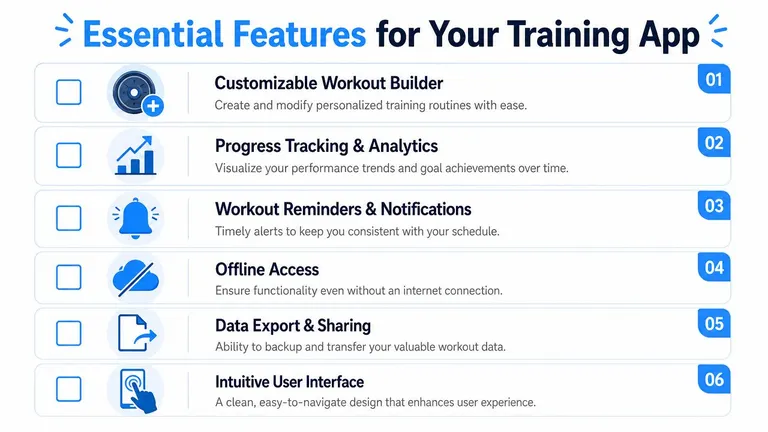
Modern apps have expanded well beyond basic logging. 50% of top-grossing fitness apps now offer wearable synchronization features, and 12% of fitness apps on iOS support Live Activities for lock-screen countdowns and timers (fitness app industry feature data). That tells you where the bar is now. Passive tracking isn’t enough.
The non-negotiable checklist
Here’s what I’d treat as mandatory for anyone running both training and peptide schedules.
-
Protocol customization
The app needs to support more than a repeating daily reminder. You want cycle length, start date, pause periods, every-day or selected-day frequency, and the ability to adjust when life interrupts the plan. -
Dose calculation tied to concentration
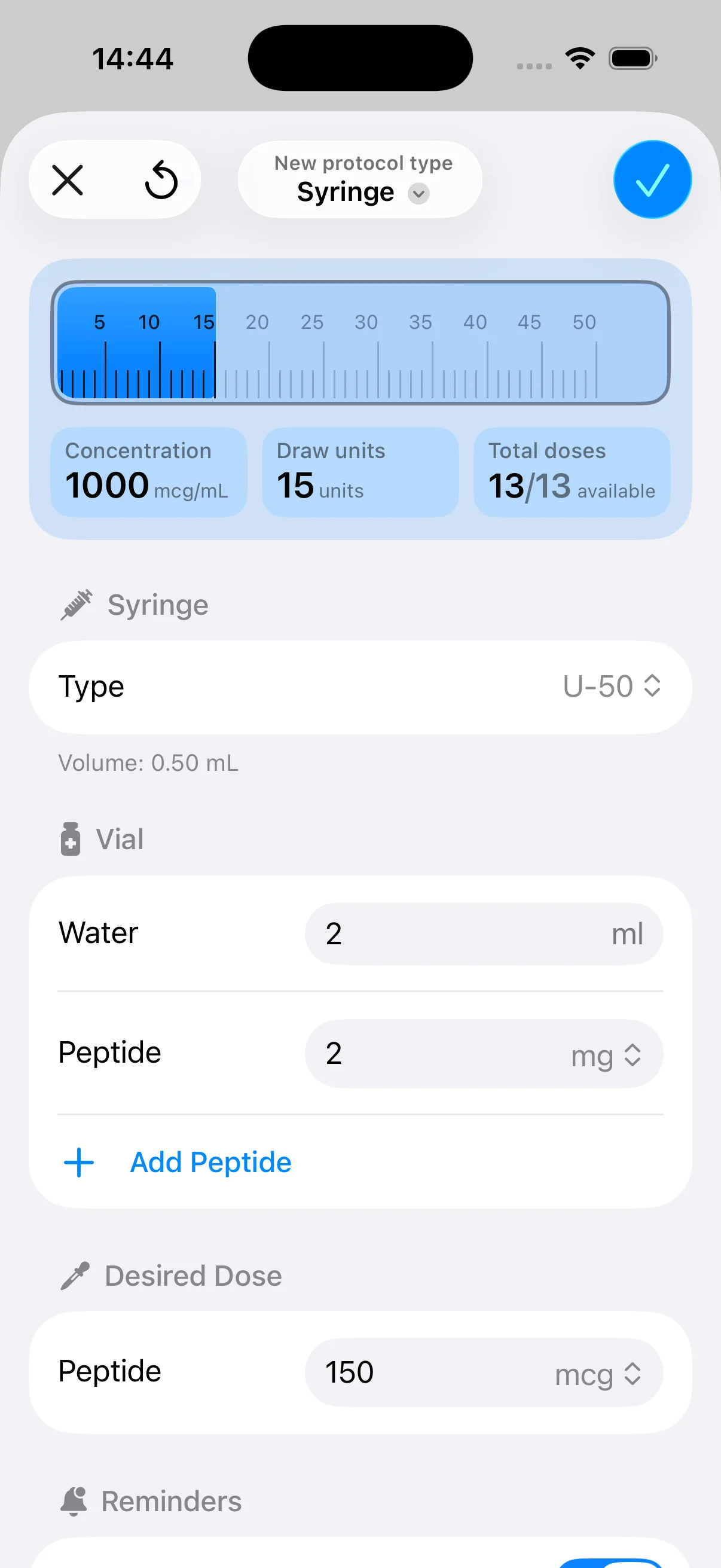
This is the big one for peptide users. You shouldn’t have to convert target micrograms into injection units in your head every time. The right setup lets you enter vial volume and concentration once, then uses that to produce practical dosing amounts. If you’re comparing options, a specialized peptide calculator app shows what this workflow should look like. -
Smart reminders, not just alarms
Good reminders are specific. They tell you what protocol is due and how long remains. Better ones support countdowns, widgets, or lock screen visibility so you don’t have to reopen the app repeatedly. -
History logging with timestamps
If you can’t confirm what happened last Tuesday at a glance, the app isn’t helping enough. Logs should make it obvious whether a dose was taken, skipped, delayed, or rescheduled.
How to evaluate apps before you commit
I’d compare apps using this quick decision table:
| Feature area | What works | What doesn’t |
|---|---|---|
| Scheduling | Flexible cycles and editable timing | Rigid repeating reminders |
| Calculation | Dose output based on vial setup | Manual calculator outside the app |
| Logging | One-tap records with clear history | Notes field only |
| Visibility | Widgets, countdowns, lock screen support | Buried reminders inside menus |
| Recovery fit | Easy rescheduling after missed events | Broken chain after one slip |
Some features are nice to have, but a few are safety features in disguise.
A dosage tool isn’t just about convenience. It reduces repeated manual math when you’re tired, busy, or switching between protocols.
I’d also check whether the app works cleanly offline, how easy it is to export your data, and whether the interface makes frequent actions effortless. You’ll use the same screens over and over. A clumsy logging flow becomes a reason to miss entries.
The practical rule is simple. If an app feels great only when your week goes exactly to plan, it isn’t flexible enough.
Integrating Peptide Protocols with Your Training Schedule
Peptide scheduling changes the stakes. A normal workout plan can usually tolerate some looseness. Move leg day to Thursday instead of Wednesday and the world doesn’t end. Peptide protocols often don’t give you that margin.
Why peptide timing changes everything
Once timing windows matter, “I’ll remember it later” stops being a strategy. You’re managing dose timing, frequency, cycle continuity, and in some cases the relationship between a dose and a training session, a meal, or a recovery block.
That’s why keeping workouts in one place and peptides in another creates unnecessary friction. You end up stitching together the day in your head. That’s where errors creep in. Not always dramatic errors. More often it’s drift. A dose gets pushed. A session gets moved. The sequence starts to blur.
For protocol-heavy users, close enough often isn’t close enough. Precision supports consistency, and consistency is the whole point of running a structured plan in the first place.
Rigid planners fail under real life
The hidden problem with most planners is that they assume perfect compliance. Miss one event and the system offers no intelligent recovery path. You’re left deciding whether to skip, stack, shift, or restart.
A 2024 MIT study found that 68% of users abandon plans when they can’t adapt to missed sessions without “breaking the chain.” That problem gets sharper when your protocol uses precise timing windows and one miss can disrupt the whole cycle.
That’s the strongest argument for integration. You don’t want separate systems for workouts, dosing, and recovery because each change affects the others. One app should let you see the schedule as a living system, not as isolated alerts.
If your schedule can’t absorb one bad day, it’s too brittle for real adherence.
Spreadsheets are especially weak here. They’re fine for planning on Sunday. They’re poor at handling Tuesday afternoon when the meeting runs long, training gets pushed, and now you need to know the next correct action immediately.
A proper training schedule app turns that into a workflow problem instead of a memory problem.
A Practical Guide to Setting Up Your Peptide Cycle in an App
Most users overcomplicate setup because they start with the schedule before they define the vial. That’s backwards. Get the vial data right first, then let the schedule sit on top of accurate numbers.
Set the vial up first
Start with the physical facts of what you have in front of you. That usually means entering the vial concentration and reconstitution details so the app can translate your intended microgram amount into a usable unit measurement.
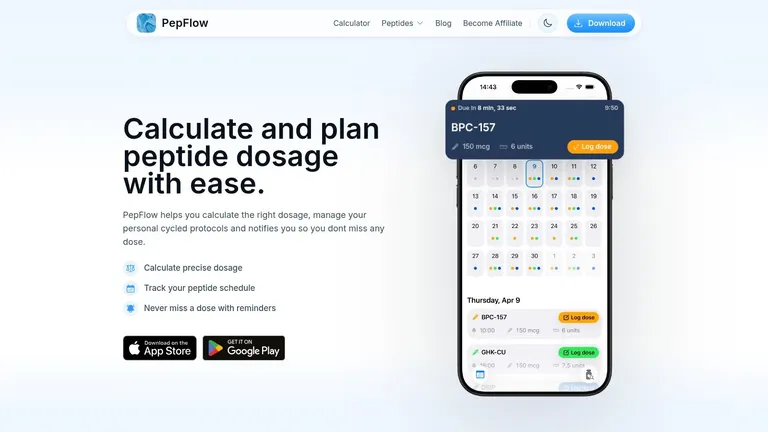
If an app doesn’t handle this cleanly, I’d stop there. Manual conversion is where avoidable mistakes start. The best apps include a dosage calculator because it removes repeated arithmetic from the daily routine. According to Trainwell’s overview of personal trainer app capabilities, expert-level training schedule apps use real-time countdowns and push notifications that reduce user error by 30 to 40% compared to manual tracking, and they typically include a dosage calculator that converts microgram targets into practical unit volumes.
A good setup flow usually looks like this:
-
Enter vial details
Add the concentration and liquid volume exactly as prepared. -
Choose the target dose
Set the intended microgram amount per administration. -
Let the app convert the dose
The app should display the practical unit amount without requiring side calculations. -
Save that vial as a reusable reference
This matters if you run similar compounds or replace vials during a longer cycle.
Build the protocol around the real routine
Once the math is stable, create the schedule itself. At this stage, people often sabotage adherence by copying an ideal plan instead of their actual week.
Set the start date, frequency, and cycle length based on when you realistically train, eat, sleep, and travel. If you know Wednesday mornings are chaotic, don’t place a precision task there unless it has to be there. Good scheduling is less about ambition and more about repeatability.
I like this checklist for protocol setup:
-
Anchor the first dose to a reliable daily event
Tie it to something that already happens, like a consistent wake block or post-training window. -
Use reminders with enough lead time
A reminder at the exact due time is often too late. You want enough notice to prepare. -
Name protocols clearly
If you run multiple compounds or phases, labels need to be unmistakable. -
Review the month view once before saving
Catch conflicts early, especially around weekends, travel, or deload periods.
The best schedule is the one you can still follow on a low-discipline day.
Use the app during the cycle, not just at setup
A lot of people do one careful setup, then stop interacting with the tool until something goes wrong. That wastes most of the value.
Use the app at the moment of action. Log doses immediately. Check countdowns instead of relying on memory. Review your history once or twice a week to spot drift before it compounds. If timing needs to change, update the protocol in the app, not in your head.
The app should become your source of truth. Once that happens, the mental overhead drops fast. You stop carrying the schedule around all day because the system is carrying it for you.
Best Practices for Adherence and Data Privacy
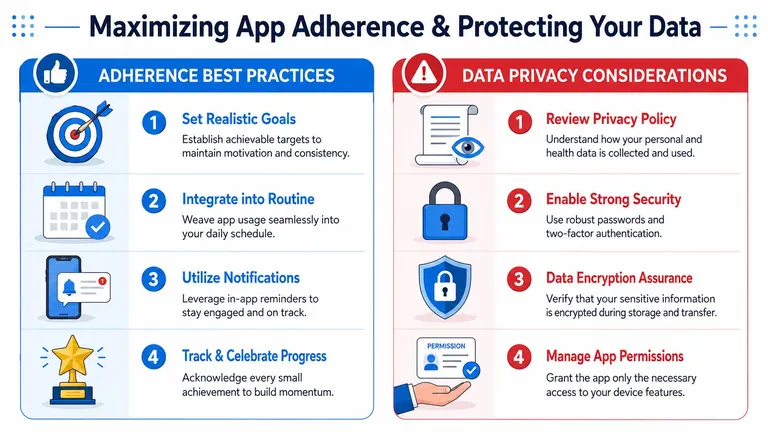
The strongest training schedule app does two jobs at once. It helps you stay consistent, and it gives you confidence that your health data isn’t being handled carelessly. Those two things are connected more than most people realize. If you don’t trust the app, you won’t use it fully. If you don’t use it fully, adherence slips.
Make adherence frictionless
Most adherence problems aren’t motivation problems. They’re interface problems, timing problems, or routine mismatch.
The easiest wins are usually operational:
-
Use widgets or lock screen visibility
If the next action is visible without opening the app, compliance gets easier. -
Log immediately after completion
Delayed logging turns into forgotten logging. -
Review the history tab weekly
Patterns show up fast when you can see delays, skips, and clustering. -
Trim unnecessary notifications
Too many alerts train you to ignore all alerts.
If you want more tactics on building reliable health routines, this guide on how to improve medication adherence maps well to peptide scheduling too.
Treat health logs like sensitive data
A peptide or supplement log can contain timing records, cycle structure, concentration details, and patterns about your health behavior. That’s not casual data. It deserves stronger handling than a generic fitness note.
Security guidance for apps in this category is straightforward. A training schedule app used for structured peptide protocols must prioritize HIPAA-compliant data encryption and secure health data integration to reduce the risk of exposing dosing logs, according to Stormotion’s discussion of secure personal training app development.
Here’s what I’d check before trusting any app:
| Privacy question | What to look for |
|---|---|
| Storage approach | Minimal cloud exposure when possible |
| Authentication | Secure login flow, ideally token-based |
| Data handling | Clear privacy language, not vague marketing |
| Integrations | Only the health connections you actually need |
| Access control | Limited permissions on the device |
Your schedule history may look boring to you. To a bad actor, it’s structured health data.
It also helps to borrow good digital hygiene from adjacent finance and identity tools. Practical checklists like these Cash App fraud protection tips are useful reminders to keep permissions tight, verify what a platform stores, and avoid treating convenience as proof of security.
The best setup is simple. Use the minimum integrations you need, keep permissions narrow, review the privacy policy before storing detailed logs, and prefer tools that don’t broadcast your data broadly.
Frequently Asked Questions About Training Schedule Apps
Can I share my schedule with a coach
Yes, but decide what you need to share. Most coaches need the training structure, missed sessions, and broad adherence pattern. They usually don’t need every health detail.
A good approach is to export only the relevant parts of the log or share screenshots of the schedule view rather than handing over unrestricted access. Separate coaching visibility from personal health privacy whenever possible.
What do paid apps usually do better
Free apps can handle basic reminders and simple logging. Paid apps usually justify themselves when you need cleaner protocol setup, better calculation tools, more flexible scheduling, clearer history, and lower-friction daily use.
The question isn’t price. It’s whether the app removes enough manual work to prevent mistakes. If it saves repeated math, reduces missed entries, and makes schedule changes easy, the paid version often earns its place.
How do I handle time zones and travel
Travel is where weak systems show themselves. Before a trip, review the coming schedule and decide whether you’ll anchor the protocol to home time or local time. Don’t improvise mid-flight.
For anything time-sensitive, set the rule before departure and update reminders as soon as you land. Keep one source of truth inside the app. Don’t split the plan between memory, screenshots, and temporary alarms.
Should I keep workouts and peptide timing in the same app
If the app can handle both clearly, yes. The fewer moving parts you have, the fewer chances there are to miss a handoff between training, recovery, and dosing.
If one app can’t do both well, use two tools only if they each have a clearly defined role. One should own the protocol timing. Otherwise you’ll end up reconciling conflicts manually.
If you want a cleaner way to manage peptide dosing, protocol cycles, reminders, and daily adherence without relying on spreadsheets or memory, PepFlow is built for exactly that job. It helps you configure vial details, convert target microgram doses into practical unit measurements, organize cycles, and stay on schedule with reminders, countdowns, and simple dose logging.