You’re halfway through a peptide protocol when a simple question suddenly becomes stressful: Did I inject yesterday, or was that the day before? The vial is in the refrigerator, your notes are scattered across timestamps, and taking another dose “just in case” feels risky. A standard phone alarm can tell you when to act, but it can’t always tell you which cycle day you’re on, whether today is a planned rest day, or how many syringe units match the dose you intended.
That’s why an injection reminder app for peptide protocols needs to do more than send a notification. It should connect timing, dose calculation, cycle phases, injection-site notes, inventory, and confirmation into one readable routine. The right setup reduces memory work without replacing the instructions of a qualified clinician or pharmacist.
Table of Contents
- The Night You Realize You Forgot Yesterday’s Injection
- What an Injection Reminder App Actually Does
- Core Features That Matter for Peptide Protocols
- Choosing an App Without Overpaying or Oversharing
- Where Most Reminder Apps Quietly Fail
- Designing a Workflow That Sticks
- How PepFlow Turns a Protocol into a Routine
- Picking the Right Setup for Your Routine
The Night You Realize You Forgot Yesterday’s Injection
It’s Tuesday night, and you’re halfway through an eight-week BPC-157 cycle. You open the refrigerator, see the vial, and try to reconstruct the last few days from memory. Sunday morning feels certain. Monday morning is less clear.
Your notes app doesn’t help much. One entry says “AM,” another contains a timestamp without a dose, and a third might refer to preparation rather than an injection. The vial is partly used, but that doesn’t answer the real question. You’re now weighing two uncomfortable possibilities, injecting twice too close together or skipping a planned dose.
This kind of confusion is easy to create when injections happen only a few times per week. Daily routines can become automatic because the same action repeats every morning or evening. A less frequent schedule leaves more room for travel, sleep changes, work interruptions, and the misleading confidence that you’ll remember the last injection later.
Practical rule: If you can’t quickly tell what was planned, what was completed, and what comes next, your tracking system is carrying too little of the workload.
A calendar entry may show that an injection was scheduled, but a schedule isn’t proof that it happened. A notes app may contain the information, but only if you remember to record it consistently and use the same format each time. Neither tool naturally understands a cycle with active days, pauses, changing doses, and injection-site rotation.
That’s the moment many users search for an injection reminder app. The relief doesn’t come from another alarm. It comes from finding a system that can answer the practical questions immediately: What day of the protocol is this? What dose was recorded last time? Is today active or paused? What should be logged after the injection?
What an Injection Reminder App Actually Does
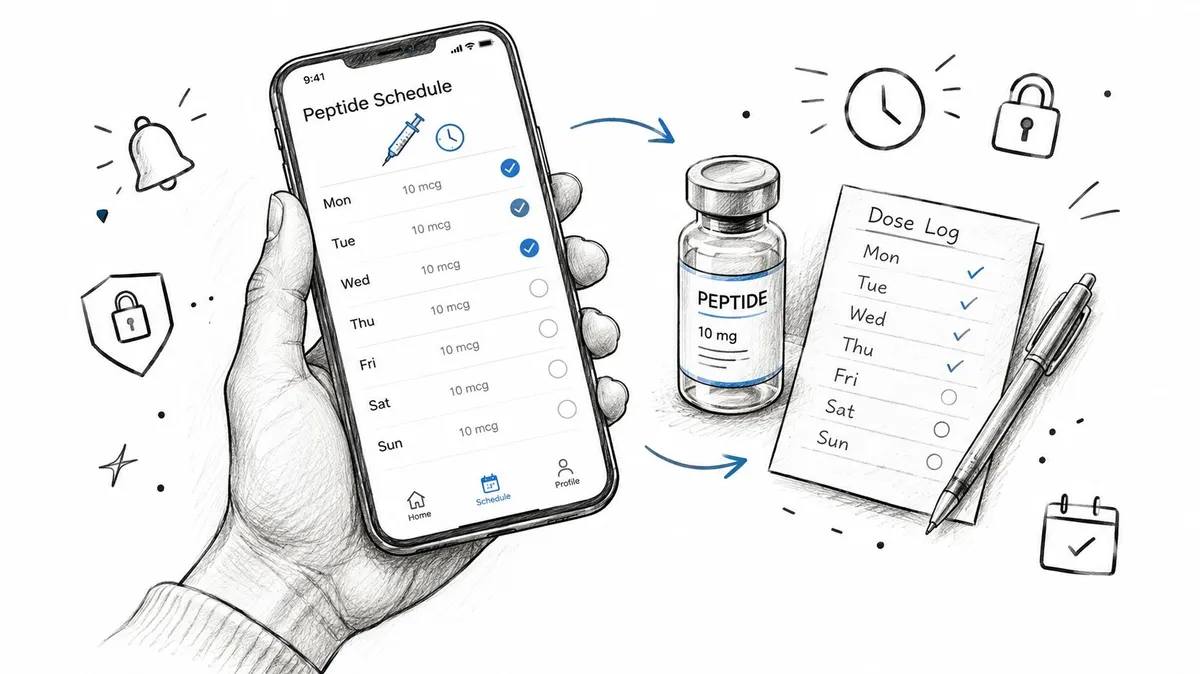
An injection reminder app is a planning and logging tool for scheduled injections. At its simplest, it gives you a dose window, sends an alert, lets you confirm what happened, and keeps a history you can review later. For peptide protocols, the useful version also understands that a schedule may contain active phases, rest periods, dose changes, and more than one vial.
A regular medication reminder often assumes a repeating daily action. A peptide-focused workflow has three extra layers:
- Cyclical timing: The protocol may alternate active days and pause days instead of repeating every day.
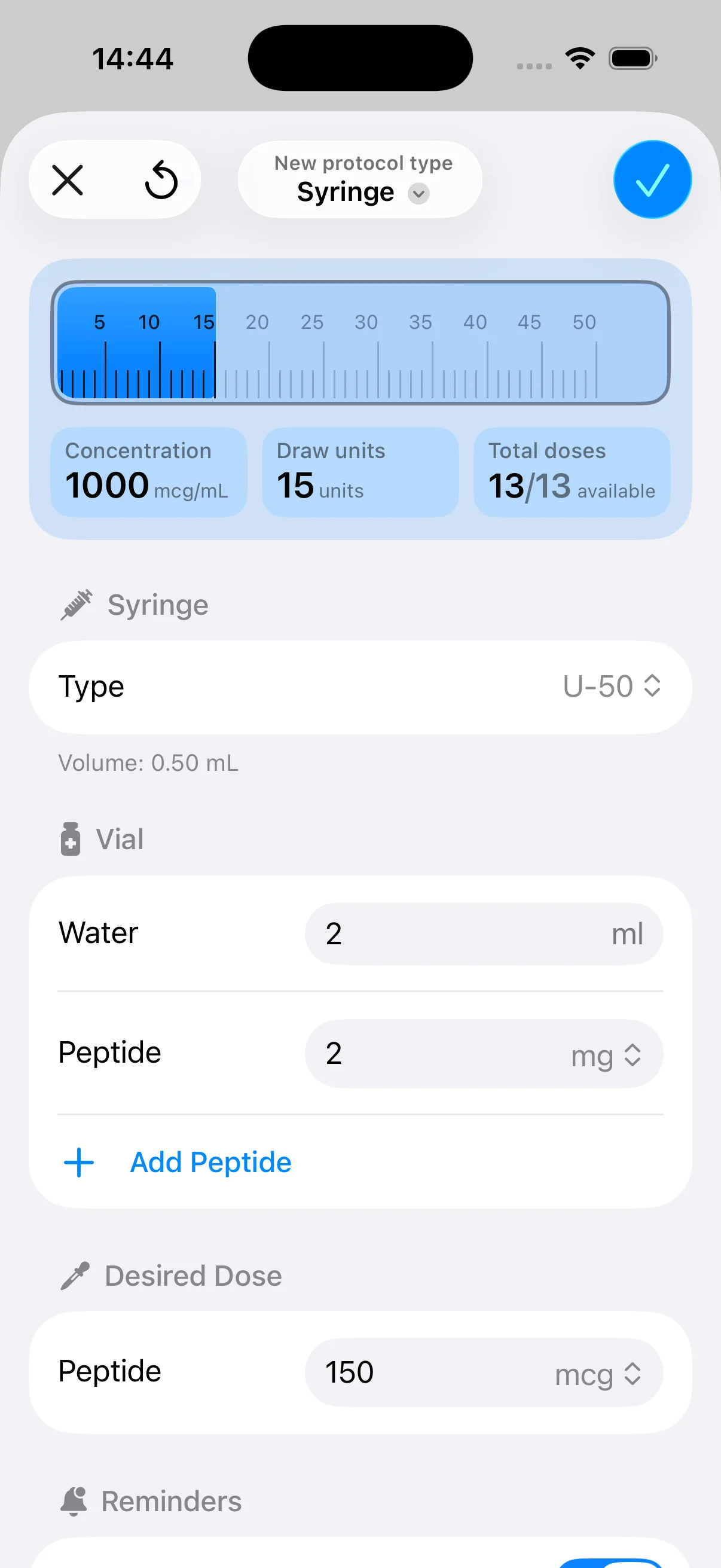
- Dose translation: The prescribed or intended amount may be expressed in micrograms, while the syringe uses units.
- Injection details: The log may need to include the vial, concentration, time, and injection site.
The app works like a coach and notebook combined. It doesn’t make clinical decisions for you. Instead, it stores the decisions you’ve already made with professional guidance and turns them into a sequence that’s easier to follow.
Start with the schedule
Enter the protocol’s start date, active frequency, pause periods, and preferred reminder window. If your instructions specify a repeating interval, use that interval rather than guessing from a weekday label. If the protocol changes after a defined phase, record the transition clearly instead of relying on memory.
Add the dose context
A useful record distinguishes between the amount you intend to use and the amount you draw into the syringe. For example, a user may enter a target of 250 micrograms, the vial’s concentration, the reconstitution volume, and the resulting syringe units. The app should make those inputs visible enough to review before logging, not bury them in an unstructured note.
Because schedules and calculations can affect safety, confirm the dose, preparation instructions, and timing with a qualified professional. PepFlow also presents planning and organization as separate from medical advice, which is the correct boundary for this type of tool. If you’re also trying to organize work, appointments, and personal habits, a visual planning system such as this daily planner for ADHD adults can help with the broader routine without pretending to manage clinical dosing.
Confirm what actually happened
The most important tap comes after the injection. Mark the dose as completed, record the actual time if it changed, and add the site or other note you’ll want during your next review. A workflow that captures reality is more useful than one that only displays an ideal calendar. For a deeper look at the difference between planned timing and completed adherence, see PepFlow’s guide to adherence to schedule.
Core Features That Matter for Peptide Protocols
An injection reminder app earns its place by solving the decisions that ordinary alarms leave behind. Four feature groups matter most: schedule logic, dose logging, reminder behavior, and history.
Flexible scheduling
A peptide schedule may involve several active days, rest days, and transitions between phases. The app should let you choose custom days, define more than one daily window when appropriate, and build a pattern such as five days active followed by two days paused.
The point isn’t complexity for its own sake. A cycle-aware calendar prevents a reminder from appearing when the protocol says to rest. It also reduces the need to rebuild the entire schedule after a planned pause or phase change.
Consider a BPC-157 and TB-500 stack. Each item may have its own timing, dose, and logging requirements. A single generic “injection” alarm can blur those differences, while separate entries with clear names preserve the distinction.
Dose logging and unit conversion
Micrograms and syringe units aren’t interchangeable labels. The conversion depends on the concentration created from the vial and the volume used during preparation. An app should therefore provide fields for the vial size, reconstitution volume, target microgram amount, and units drawn.
A 250 microgram example illustrates why this matters. The target amount alone doesn’t tell you the syringe marking without the concentration. The calculation should be checked against the preparation instructions and professional guidance, then saved with the protocol so you aren’t repeating the same math from memory.
The log should also record what was administered, not only the planned amount. If a dose changes, the history needs to show when and why the schedule moved to the new setting.
Reminder behavior after the alert
A notification is only the start of the workflow. The app should let you snooze within an appropriate window, mark the dose complete, identify a missed dose, and stay quiet during planned rest periods. Escalation can be useful when a dose remains unconfirmed, but it should never pressure you into making an unsupervised clinical decision.
A thoughtful reminder answers two questions: Is action due now, and what happens if I don’t confirm it? That second question separates a functional adherence tool from a repeating alarm that slowly becomes background noise.
History, export, and site rotation
A good history view shows planned dates alongside completed entries. It may also include the actual time, dose, units, vial, and injection site. Site tracking supports a simple rotation habit, such as alternating sides or locations according to professional instructions.
Export matters when you need to discuss the record with a clinician. A readable history can help you explain missed doses, timing changes, or repeated site use more clearly than a collection of screenshots.
| Feature | Peptide problem it solves |
|---|---|
| Cycle-aware scheduling | Prevents alerts during pause periods and supports changing phases |
| Dose and unit fields | Keeps microgram targets connected to syringe measurements |
| Completion confirmation | Separates a scheduled dose from an injection that actually happened |
| Site and vial notes | Makes preparation and rotation details easier to review |
| History and export | Helps identify timing patterns and share an organized record |
Evidence supports looking beyond the alert itself. A systematic review reported poor-adherence patient-months falling from 29.9% in the control group to 17.0% with a monitor and 13.9% with a combined intervention in its review of text-message, monitor, and combined interventions. The practical lesson is that confirmation, monitoring, and follow-up can matter after the notification fires.
Choosing an App Without Overpaying or Oversharing
The cheapest injection reminder app may be enough for a simple interval. It may also force every protocol into a daily template, hide unit conversion behind a blank notes field, or offer no useful way to record a pause. The most expensive option may add caregiver tools, pharmacy connections, or device integrations that you’ll never use.
Start by comparing the app against your actual routine. Ask whether you need a weekly interval, a multi-phase cycle, multiple vials, site notes, offline access, or an exportable history. Then check what happens to your data. A record of injection dates, doses, and health-related notes deserves the same care as any other sensitive personal information. A practical overview of responsible storage, access, and sharing is available in this Venus Health Co. data management guide.
Compare trade-offs before downloading
| Priority profile | Must-have feature | Nice-to-have | Watch out for |
|---|---|---|---|
| Privacy-first setup | Clear data ownership and local or controlled storage | Passcode protection and export | Vague sharing language or cloud-only dependence |
| Cycle-focused user | Active phases, pause periods, and custom intervals | Countdown views and widgets | Fixed daily templates |
| Multi-vial routine | Separate protocols and dose records | Inventory alerts | One generic medication entry |
| Calculation-focused user | Concentration and unit conversion fields | Saved vial presets | Manual math buried in free-text notes |
| Feature-rich tracker | Reliable reminders and detailed history | Integrations and caregiver access | Paying for tools unrelated to your routine |
Reliability also matters more than a crowded feature list. Check whether alerts work during quiet hours, whether the app handles a changed injection time, and whether it distinguishes a skipped dose from a completed one. If you often travel or lose connectivity, ask whether core schedules and logs remain available offline.
A routine app can be useful when the main problem is organizing habits across the day, while a peptide tracker needs protocol-specific logic. Before browsing, create a must-have column with the features you won’t compromise on. For broader routine planning, you can also compare the principles in PepFlow’s routine schedule app guide, then reject any tool that can’t represent your actual protocol.
Where Most Reminder Apps Quietly Fail
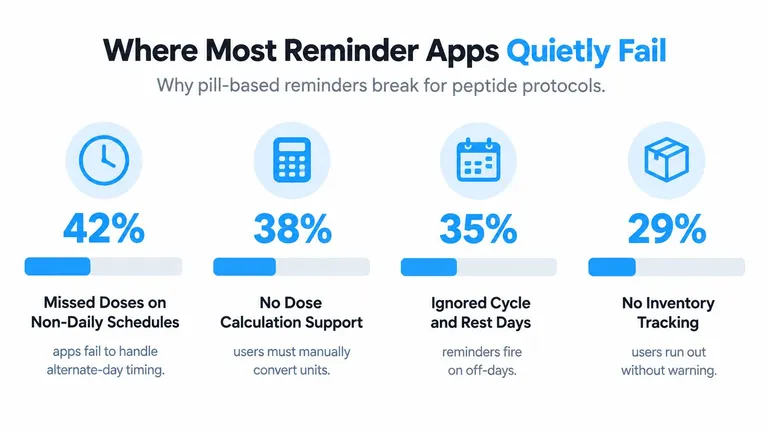
Many reminder apps were built around pills taken at predictable daily times. That design can seem suitable until you apply it to a protocol with active phases, rest days, dose changes, and unit-based injection logging.
The first failure is alert fatigue. If the app sends the same notification every day, including days when no injection is planned, you’ll eventually mute it or swipe it away automatically. The reminder then loses meaning precisely when you need it.
Rigid weekday logic creates another problem. A schedule tied permanently to Monday can drift after a delayed injection, while a five-days-on, two-days-off plan may require a cycle pattern rather than a repeating weekday. Tapering or changing doses can also turn a static event into an inaccurate record.
The log becomes the weak link
Some apps offer an “add note” box but no structured fields for micrograms, units, vial concentration, or site. That forces users to invent their own shorthand. A week later, the record may be impossible to audit because “250, left, AM” doesn’t explain whether 250 refers to micrograms, units, or a planned amount.
Inventory is often disconnected too. A reminder can tell you that a dose is due while ignoring whether the vial has enough usable supply. If the app doesn’t track remaining doses or provide a low-stock prompt, the user discovers the problem at the worst possible moment.
Privacy failures are quieter but serious. Cloud-only storage, unclear retention policies, and broad sharing permissions can expose a detailed health routine without offering a clear benefit. Better design treats reminders, logs, inventory, and privacy as one system. Each part should support the same question: can the user follow and review the protocol without unnecessary guesswork?
Designing a Workflow That Sticks
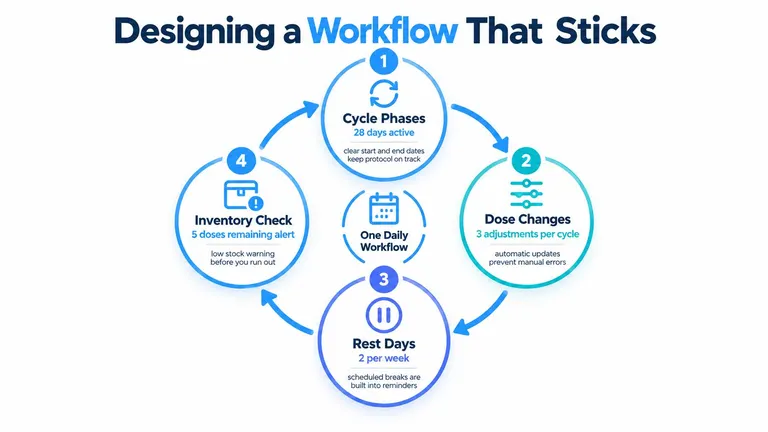
A consistent workflow has three touchpoints, not one. The first happens during a morning check or the selected reminder window. You confirm whether the day is active, paused, or part of a changed phase.
The second touchpoint occurs after the injection. Log the actual dose, syringe units, time, vial, and site while the details are still fresh. If the dose didn’t happen, record that clearly rather than dismissing the alert and leaving the history ambiguous.
Review the pattern, not just the streak
Use a weekly review to compare planned entries with completed ones. Look for timing drift, repeated sites, dose changes, and inventory concerns. The purpose isn’t to create a perfect record for its own sake. It’s to catch small discrepancies before they become confusing.
A cycle may include an active phase, a pause, and a new dose setting. When those elements live in separate notes, each transition creates another memory task. When they connect inside one app, the schedule provides the context, the log captures reality, and the history shows what changed.
For practical consistency ideas, PepFlow’s guide to staying on track focuses on reducing the number of decisions required during a routine. The best workflow removes questions such as “Did yesterday count?” and “What comes next?” without asking the app to determine whether a dose is medically appropriate.
How PepFlow Turns a Protocol into a Routine
PepFlow presents the process as a connected loop: calculate, schedule, remind, log, and review. Start with the dose calculator. Enter the relevant vial and concentration details, then use the resulting unit measurement as a planning reference. Confirm all preparation and dosing details with a qualified professional before administration.

Next, create the protocol with its start date, frequency, and pause pattern. A cycled routine such as five active days followed by two rest days should appear as a cycle, not as a collection of unrelated alarms. That distinction helps the calendar reflect the protocol’s structure.
The reminder then arrives at the selected time. After completing the injection, use the log action to record it. If the timing changes, record the actual event rather than pretending the original plan occurred. That keeps later reviews based on what happened.
Why the handoff matters
The calculator informs the dose record. The schedule tells the app when to prompt you. The reminder creates the moment to act. The log confirms the event, and the history lets you inspect consistency across the cycle.
PepFlow is one example of a tool built around that sequence. Its feature set includes dose calculation, cycled protocols, reminders, countdown views, and dose history. It’s designed for planning and organization, not for diagnosing conditions, selecting substances, or replacing professional medical advice.
A complete workflow also needs a boundary for uncertainty. If you’re unsure whether you already injected, don’t use the app to make a clinical guess. Review the record, preserve the ambiguity, and contact a qualified clinician or pharmacist for instructions about what to do next.
Picking the Right Setup for Your Routine
Choose the smallest injection reminder app setup that solves your real problems. More screens don’t automatically produce better adherence, and more integrations can create extra places for information to become inconsistent.
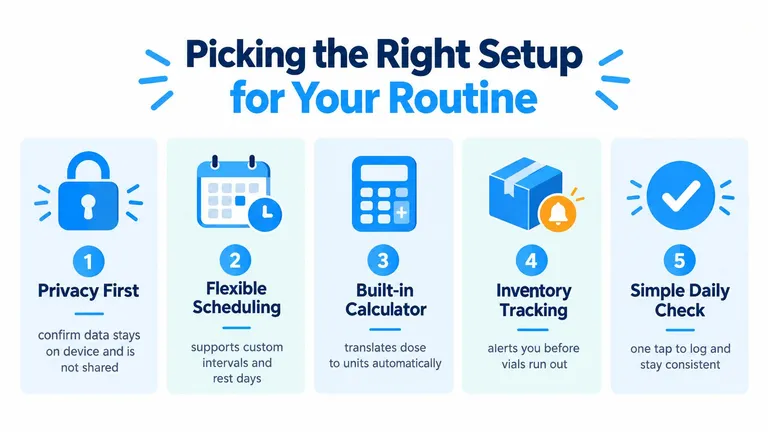
Use this checklist before downloading:
- Privacy first: Confirm where injection records are stored, who can access them, and whether sharing is optional.
- Protocol flexibility: Verify that the app supports custom intervals, active phases, pauses, and dose changes.
- Calculation accuracy: Check whether it can connect the intended microgram amount to syringe units using your vial details.
- Reminder behavior: Look for quiet rest days, useful snoozing, persistent confirmation, and clear missed-dose handling.
- Logging depth: Make sure you can record the actual dose, time, vial, and site without turning every entry into busywork.
Don’t start with every optional feature. Set up one protocol, confirm that the schedule matches your professional instructions, test the reminder and completion flow, and review the history after several entries. If the system answers what is due, what was completed, and what comes next, it’s doing the work you need.
PepFlow combines dose calculation, cyclical protocol scheduling, reminders, countdowns, and dose history in one lightweight workflow for organized peptide tracking. Visit PepFlow to see whether its approach fits the way you manage timing, pauses, unit conversion, and injection logs.